Real estate AI integrations: the operator's map
The systems real estate and property operators already run, what AI can safely do inside each, how each one lets you in, and the order to connect them.
Published: 2026-08-08 · Author: Ahmed Heshmat · 17 min read
In short: Every AI integration in real estate is a permission decision, not a software decision. The systems you already run, the property management platform, the CRM, the phones, the inbox, the portals, the ledger, sort into a small set of categories, and inside each one AI can hold one of three permission levels: read, draft, or act. This guide maps the stack an operator actually runs, what AI can safely do inside each part of it, how each system lets you in, and the order to connect things so trust is earned instead of assumed.
Key takeaways
- You do not need new software to use AI. The leverage is in connecting the systems you already pay for, in the right order.
- Every integration should hold the lowest permission that does the job: read before draft, draft before act.
- The connection path matters as much as the feature list. An open API, a partner program, licensed board data, and a portal with no API at all are four different projects.
- A surprising amount of real estate lead flow still arrives as notification email. Parsing that email well is an integration, and often the highest-value one.
- Keep a person wherever judgment lives: pricing, screening, legal notices, money movement, and anything a tribunal or regulator could one day ask about.
Start from the stack you already run
When operators ask us about AI, the question usually arrives as "which tool should we buy." It is almost always the wrong first question. A property management company or brokerage already runs a stack: a system of record, a CRM, phones, an inbox, two or three listing portals, a scheduling tool, a signature tool, and an accounting file. That stack took years to settle. The teams know it. The data lives in it.
The right first question is: what is AI allowed to touch, in the systems we already have?
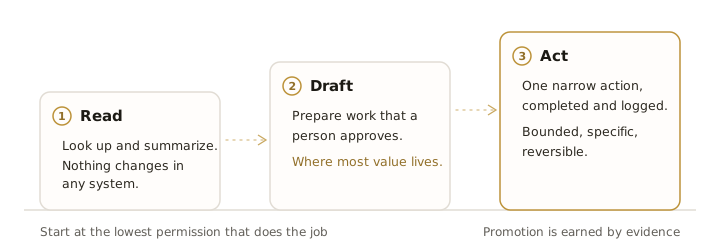
Framed that way, every integration becomes a permission decision. We build these connections for a living, and every one we ship sits at one of three levels:
- Read. The AI can look things up and summarize. Pull a tenant's ticket history before a call. Turn a month of maintenance data into an owner-ready summary. Nothing changes in any system.
- Draft. The AI prepares work that a person approves. A reply to a lead sits in the outbox until someone sends it. A work order is staged, not submitted. This is where most of the value lives, and where most integrations should stay for their first months.
- Act. The AI completes one narrow, low-risk action on its own, and logs it. Booking a showing into an open calendar slot. Creating a contact record from a portal lead. Filing a routine work order at 2 a.m. Each action is specific, bounded, and reversible.
The rest of this guide walks the stack category by category. For each one: what the systems are, what AI can genuinely do inside them today, and where the person stays. The tools named are the ones we run into most in Canadian property management and brokerage work. The market moves quickly, so treat any specific feature or access detail as something to verify the week you need it.
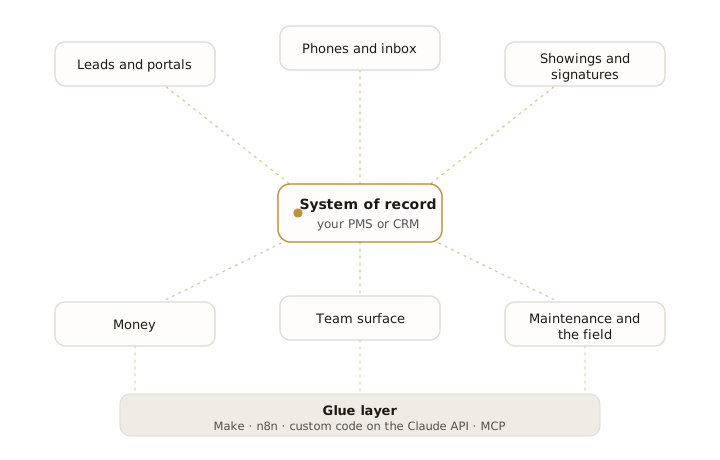
1. The system of record
Everything else on this map orbits one system: the place where the truth about your units, tenants, deals, and owners lives. For property managers that is the management platform. For brokerages and sales teams it is the CRM.
| System | What it is | What AI can do today | Where the person stays |
|---|---|---|---|
| Buildium | PM platform with an open, well-documented API | Read anything, draft communications, file routine records | Lease terms, money movement |
| AppFolio | PM platform, API access by arrangement, its own AI layer built in | Use the built-in AI first; connect around it where access allows | Approvals inside the platform |
| Rentvine | Newer PM platform with an API-forward posture | Strong base for custom reads, drafts, and record-keeping | Same as above |
| Propertyware, Yardi Breeze | Established PM platforms, access varies by product and plan | Read and draft through available connectors | Same as above |
| Follow Up Boss | Sales CRM with a public API and reliable webhooks | Full read, draft, and narrow act: log calls, create contacts, stage follow-ups | Deal advice, pricing conversations |
| BoldTrail (kvCORE) | Brokerage platform, partner-level access | Read and draft through approved connectors | Same as above |
| GoHighLevel | Marketing and CRM platform with a broad API | Automations, drafted outreach, pipeline hygiene | Anything that sends without review |
| LeadSimple | PM-specific sales and process CRM with an API | Process automation, lead record hygiene, drafted replies | Owner-facing commitments |
| HubSpot, Zoho CRM, Salesforce | General CRMs with mature public APIs | The deepest integration surface on this list | Judgment calls, always |
Two practical notes from the field. First, if your platform ships its own AI features, turn those on and test them honestly before you connect anything external. You may already be paying for the capability. We wrote a full buyer's guide to that layer in our AI property management tools comparison.
Second, the quality of a platform's API decides how good any integration can ever be. A clean API with webhooks means events reach your automation in seconds. No API means you are stitching together exports and email, which can still work, but it caps what you should trust the system to do. We covered the platform-specific version of this in automating Buildium and AppFolio with AI.
2. Where leads and listings live
This category has the widest gap between what people assume and what is actually possible. The assumption: connect the AI to the portals. The reality: most portals do not offer an operator a lead API at all.
| System | What it is | What AI can do today | Where the person stays |
|---|---|---|---|
| Realtor.ca | Canada's national listing portal, data flows through CREA's licensed DDF feed | Leads arrive as email; parse them into the CRM within minutes | The follow-up conversation |
| MLS boards | Licensed listing data, increasingly via the RESO Web API standard | Look up and summarize listing data through licensed access | Never hand raw credentials to a model |
| IDX website provider | Your licensed listing search on your own site | Route form fills straight into intake | Same-day human follow-up |
| Zillow | US portal, lead delivery for partner programs | Where a partner path exists, leads flow directly; otherwise email | The conversation |
| Apartments.com, Zumper | Rental listing portals | Leads arrive as notification email; parse, dedupe, route | Showings and screening |
| Kijiji, Facebook Marketplace | High-volume Canadian rental lead sources, no operator API | Email and inbox parsing again, done carefully | Same as above |
| Meta lead ads | Paid lead forms on Facebook and Instagram | Real API path: leads land in the CRM the moment the form submits | Ad spend decisions |
| Google Business Profile | Reviews, calls, and questions from local search | Read and draft review replies for approval | Posting the reply |
The honest headline here: the notification email is the integration. For Realtor.ca, Apartments.com, Kijiji, and most of the rental portals, the only thing an operator reliably receives is an email that a lead came in. A well-built parser reads that email, extracts the person, the property, and the question, creates a clean CRM record, checks for duplicates, and starts the follow-up sequence. It is unglamorous and it is the single most common integration we build, because speed to first response is where lead conversion is won or lost. The full pattern is in how to automate lead intake.
On listing data: MLS and board data is licensed, and the licence matters. The right architecture gives the AI a narrow tool that queries your licensed feed and returns structured results. The wrong architecture pastes board credentials into a model and hopes. If a vendor cannot explain which of those two they built, assume the second.
3. The phones and the inbox
Communication systems are where AI earns its keep fastest, because they are where the interruptions live.
| System | What it is | What AI can do today | Where the person stays |
|---|---|---|---|
| Twilio | Programmable calls and SMS, the base layer for most voice AI | Full read, draft, and act: answer, route, transcribe, text back | Escalation rules a person wrote |
| OpenPhone, RingCentral, Aircall | Business phone systems with APIs | Call logging, transcript summaries into the CRM | Callbacks that need judgment |
| Gmail, Google Workspace | Email, calendar, files, with mature APIs | Triage the inbox, draft replies, extract commitments | Sending anything sensitive |
| Outlook, Microsoft 365 | Same, via the Graph API | Same | Same |
| WhatsApp Business | Where many tenant conversations actually happen | Structured messages and drafted replies through the business API | The conversation itself |
The phones deserve the most attention. A missed call in property management is not a minor annoyance: it is a tenant with water coming through a ceiling, or a lead who dials the next listing thirty seconds later. An AI voice agent that answers every call, handles the routine ones, and routes the real emergencies to a person is the single highest-leverage integration we deploy. That work is its own topic, covered on our voice agents page.
One rule holds across every channel in this category: outbound is different from inbound. An AI that answers what people send you is a service. An AI that sends commercial messages on its own is a compliance question. In Canada, CASL sets real requirements around consent and unsubscribe for commercial electronic messages. Drafted-for-approval outbound keeps a person in that loop. Autonomous outbound should be treated as a decision your lawyer participates in, not a toggle a vendor flips.
4. Showings, scheduling, and signatures
| System | What it is | What AI can do today | Where the person stays |
|---|---|---|---|
| ShowingTime, BrokerBay | Showing coordination, access governed through boards and brokerages | Read schedules, prepare confirmations where access allows | Access instructions, lockbox codes |
| ShowMojo, Tenant Turner | Rental showing automation | Self-serve booking against real availability | The showing itself |
| Calendly, cal.com | General scheduling with clean APIs | Booking links in every drafted reply; slots filled without back-and-forth | Calendar boundaries |
| DocuSign | E-signature with a mature public API | Assemble routine packets from approved templates, track status, chase signatures | Terms, clauses, anything negotiated |
| Dropbox Sign, dotloop, Lone Wolf Transactions | Signatures and transaction rooms, access varies | Status tracking and reminders | Same as above |
Scheduling is the quiet win in this category. "AI that books showings" sounds futuristic and is mostly plumbing: real availability exposed through a scheduling tool, a booking link included in every fast reply, confirmations and reminders sent automatically. No conversation required.
Signatures are the opposite: the mechanics automate beautifully and the content must not. Generating a routine lease packet from an approved template, sending it, and chasing the unsigned copy is exactly the kind of bounded, reversible work AI should do. Deciding what goes in clause fourteen is not.
5. The money
| System | What it is | What AI can do today | Where the person stays |
|---|---|---|---|
| QuickBooks Online, Xero | Accounting, both with mature public APIs | Draft categorization, reconciliation prep, owner report assembly | Approving the books |
| The trust ledger in your PM platform | Where regulated client money lives | Read and summarize | Everything else |
| Plaid | Bank data connectivity | Feed transaction data into reconciliation drafts | Account access decisions |
| Stripe and payment processors | Card and payment rails | Receipt matching, failed-payment follow-up drafts | Refunds, disputes |
Our rule for money is the shortest one in this guide: AI drafts, a person posts. Categorization suggestions, matched receipts, a reconciliation with every anomaly flagged and explained, an owner statement assembled and waiting for review: all real, all valuable, all safely on the draft side of the line. Moving money, posting to a trust ledger, and touching anything an auditor will one day open stays with a person, permanently. This is not a temporary limitation of the technology. It is how the system stays defensible.
6. Maintenance and the field
| System | What it is | What AI can do today | Where the person stays |
|---|---|---|---|
| Property Meld | Maintenance coordination for PM operations | Structured intake, status updates, vendor communication drafts | Emergency dispatch rules |
| Mezo, Lula | AI-led maintenance intake and triage | Diagnostic questions up front, tickets arriving pre-triaged | The emergency path |
| Jobber | Field service platform for trades, with a public API | Job creation from parsed requests, quote follow-ups, schedule prep | Pricing the job |
| Housecall Pro, ServiceTitan | Field service platforms, API access varies by plan | Similar, through available access | Same |
Maintenance is where AI claims deserve the hardest look, because the failure mode is not a mislabelled ticket. It is a tenant with a gas smell talking to software that thinks it is handling a dripping tap. Whatever handles intake must have an emergency path that pages a human, and that path needs to be tested against your worst real tickets, not the vendor's demo data.
Done right, this is also one of the most satisfying categories to automate. Requests arrive on five channels and leave as one clean, triaged queue. The 2 a.m. call becomes a filed work order with photos requested, an on-call person paged only when the keywords warrant it, and a full trail of who was told what, when.
7. The team surface and the glue layer
Two quieter categories complete the map: where your team sees the automation, and what holds the connections together.
| System | What it is | What AI can do today | Where the person stays |
|---|---|---|---|
| Slack, Microsoft Teams | Where the team already lives | Surface everything here: summaries, alerts, drafted work waiting for review | Acting on what the alert says |
| Notion | Docs and internal knowledge | Keep SOPs and playbooks current, answer team questions from them | Approving the playbook |
| Make, Zapier, n8n | No-code and low-code workflow tools | The fastest way to ship simple, linear connections | Workflow design |
| Custom services on the Claude API | Purpose-built integration code | Everything the no-code tools cannot do: judgment steps, proper error handling, scale | The gate list, the code review |
| Model Context Protocol (MCP) | An open standard for giving models narrow, typed tools | The clean way to expose "create a work order" without exposing the whole platform | Which tools exist at all |
The team surface matters more than it looks. An automation the team never sees is an automation the team never trusts. Routing every draft, alert, and summary into the channel people already watch is what turns "the AI did something" into "the queue is ready for review."
The glue layer is also where ownership is decided. A workflow locked inside a vendor's black box belongs to the vendor. A workflow built on tools you control, with code you own, survives every renegotiation. We wrote up how we choose between the options in Make.com vs n8n vs custom Claude.
How these systems let you in
Feature lists get the attention. Access paths decide the project. Every system on this map connects through one of four doors, and the door changes the cost, the timeline, and what you should promise yourself.
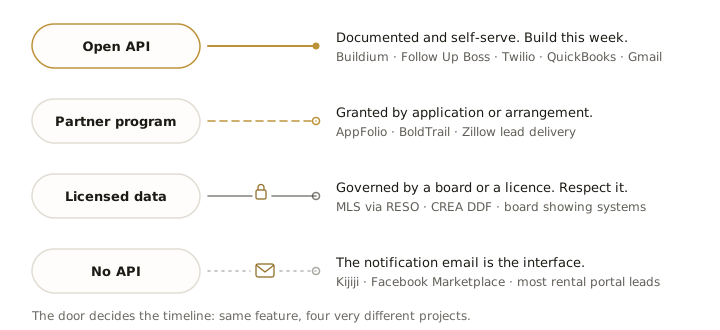
| Access path | What it means | Examples from this map |
|---|---|---|
| Open API | Documented, self-serve, build today | Buildium, Follow Up Boss, Twilio, QuickBooks Online, Gmail, DocuSign, Slack |
| Partner program | Access exists, granted through application or arrangement | AppFolio, BoldTrail, Zillow lead delivery, several transaction platforms |
| Licensed data | Access governed by a board, licence, or regulator | MLS data via RESO, CREA's DDF feed, showing systems tied to boards |
| No API | The system tells you things by email, or not at all | Kijiji, Facebook Marketplace, most rental portal lead flows |
Three things follow from this table. First, ask about the door before you fall in love with the feature. A one-week build against an open API becomes a one-quarter project behind a partner program, and a different project entirely when the only interface is email.
Second, the no-API tier is not a dead end. Email parsing, done carefully with validation and deduplication, is how a large share of real-world lead flow gets automated. It is less elegant than a webhook and it works.
Third, licensed data deserves respect, not workarounds. Scraping around a board's licence terms to feed a model is a way to lose the data access your business runs on. The licensed path is slower and it is the one that still exists next year.
One connected workflow, end to end
Maps are abstract. Here is what one of these integrations looks like in production, drawn from the systems we build and operate: the after-hours maintenance call.
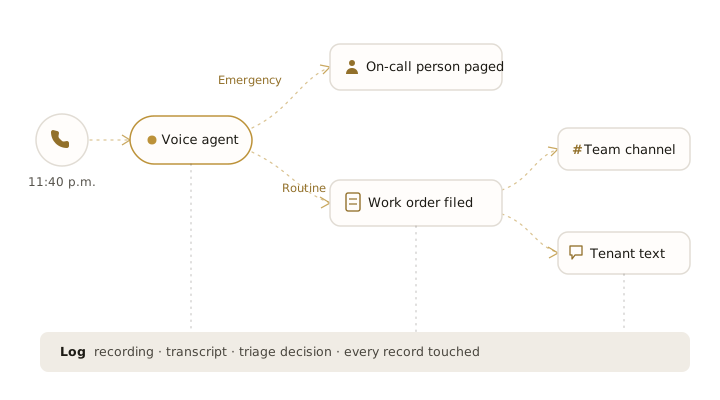
- The call comes in at 11:40 p.m. Nobody is in the office. The voice agent answers on the second ring.
- The agent identifies the situation. It asks what a good coordinator would ask: what is happening, which unit, is anyone in danger, is water or gas involved.
- The triage rule fires. The rule was written by a person, in advance, and it is deliberately conservative. Flood, gas, no heat in February, anything ambiguous: page the on-call human immediately. Everything else continues.
- The work order is drafted in the system of record. Unit, tenant, category, description, urgency, photos requested by text. Not an email someone must retype. A structured record in the platform the team already works in.
- The team is told. A message lands in the operations channel with the summary and a link to the record. The morning person opens a queue, not a mystery.
- The tenant gets confirmation. A text with the ticket reference and what happens next. The 11:40 p.m. anxiety gets an answer at 11:43 p.m.
- Everything is logged. The recording, the transcript, the decision the triage rule made, and every record the system touched. If anyone ever asks how this call was handled, the answer takes minutes to produce.
Count the permission levels. The agent read nothing sensitive, acted on exactly one narrow thing it was allowed to do, filing a routine work order, and every judgment call either followed a rule a person wrote or went straight to a person. That shape, not any particular tool, is what a safe real estate AI integration looks like.
The rules that keep an integration safe
Six rules sit under every integration we ship. They are the difference between a system you can defend and a demo that got promoted.
- Narrow actions only. The AI never gets general access to a system. It gets specific tools: create a work order, look up a tenant, stage a reply. Each tool validates its inputs and can be listed on one page.
- The lowest permission that works. Scoped keys, least privilege, and credentials that rotate. If a token leaks, the blast radius is one narrow capability, not your CRM.
- A written human-gate list. Decide in advance, in writing, what always goes to a person: money movement, legal notices, screening decisions, pricing, emergencies. The list is a policy document, not a vendor setting.
- Consent and privacy by design. In Canada that means PIPEDA on personal information and CASL on commercial messages. Consent recorded, unsubscribe honoured, personal data staying in the systems that already hold it. Our full commitments are on the trust page.
- A log someone else could audit. Every automated action traceable: what fired, why, what it touched, what it produced. If you cannot reconstruct last Tuesday, you do not have an integration, you have a liability.
- Reversible, and yours. Drafts beat sends, staging beats posting, and the client owns the code. If we disappeared tomorrow, the systems keep running and the data was never anywhere but yours.
The order to connect things
The last mistake to avoid is sequencing. The instinct is to connect everything and turn it on. The version that survives contact with a real operation goes in this order:
- Read first. Connect a system read-only and let the AI summarize for a few weeks. Morning digests, ticket summaries, lead reports. Zero risk, immediate value, and the team learns what the AI gets right.
- Then draft. Let it prepare replies, records, and reports that people approve. Watch the approval rate. When nine out of ten drafts go out unedited, you have evidence, not vibes.
- Then act, narrowly. Promote one workflow, the lowest-risk one with the clearest rules, to autonomous. Filing routine work orders. Booking showings into open slots. One workflow, watched closely.
- Then expand. Repeat the same ladder for the next workflow. The order is set by risk and by evidence, never by what demos well.
This is the integration version of a principle we keep coming back to in where AI actually lands in a property management operation: automate the intake, never the judgment. Intake is where the volume is. Judgment is where your business is.
If you want the map above turned into a plan for your specific stack, that is literally what the AI audit produces: two weeks inside your operation, ending in a ranked list of which of these integrations pays first, and which are not worth building at all.
Frequently asked questions
Can AI update Buildium or AppFolio directly?
With Buildium, yes: the API supports reading records and creating entries such as work orders and contacts, so an integration can file structured records directly. AppFolio's access is granted by arrangement, so many operators start with AppFolio's own built-in AI features and connect external automation where access allows. In both cases we recommend starting with drafts that a person approves before letting anything write autonomously.
Do I need to replace my CRM or platform to use AI?
Almost never, and be suspicious of anyone whose answer is yes. The point of integration is that AI works inside the systems your team already knows. A platform switch is occasionally worth it for other reasons, but "our AI only works on our platform" is a lock-in strategy dressed up as a feature.
Can an AI agent respond to my Realtor.ca or Kijiji leads?
Yes, but not the way most people picture it. Those portals deliver leads to operators as notification emails, so the integration is an email parser: it reads the notification, creates a clean CRM record, and triggers a fast, drafted first reply. The speed matters more than the sophistication. A lead answered in three minutes converts differently than one answered after lunch.
Can I connect a language model straight to MLS data?
Not with raw credentials, and you should not want to. MLS and DDF data is licensed, and the terms govern how it is accessed and displayed. The safe architecture gives the model a narrow, licensed lookup tool that returns structured results it can reason over. Anyone proposing to scrape or proxy board data into a model is risking the access your business depends on.
Is Zapier or Make enough, or do I need custom integration work?
For a single linear workflow, the no-code tools are often enough, and we build with them where they fit. They get expensive and fragile when volume grows, when a workflow needs judgment in the middle, or when errors must be handled properly rather than silently dropped. The honest comparison, including when we recommend against custom work, is in Make.com vs n8n vs custom Claude.
How do these integrations stay compliant in Canada?
Three anchors. PIPEDA governs how personal information is collected and used, so tenant and client data stays in the systems that already hold it rather than being copied into third-party tools. CASL governs commercial electronic messages, so outbound is consent-checked and drafted for human approval. And human-rights law in every province constrains screening decisions, which is one of several reasons screening stays with a person in every system we build. Compliance is an architecture input, not a checkbox at the end.